Pathling server 3.0.0
Pathling server 3.0.0 is now available. It lets you build SQL queries out of other SQL queries, export a set of related views and queries as one consistent snapshot, and monitor every asynchronous job on the server from a single place. It also aligns the server with the operations balloted in version 3.0.0 of the SQL on FHIR specification.
Reuse SQL across queries
In 2.x, a SQL query could read from ViewDefinitions but not from other queries. Logic that several queries shared, such as a cohort filter or a derived column, had to be repeated in each one. Server 3.0.0 adds SQLView Libraries: named SQL table sources that can be read by queries and by other views. Common logic is written once, stored on the server and referenced by canonical URL.
Suppose the demographics ViewDefinition below is stored with the canonical URL
https://example.org/ViewDefinition/demographics:
{
    "resourceType": "ViewDefinition",
    "url": "https://example.org/ViewDefinition/demographics",
    "name": "demographics",
    "resource": "Patient",
    "status": "active",
    "select": [
        {
            "column": [
                { "name": "id", "path": "id" },
                { "name": "family", "path": "name.first().family" },
                { "name": "gender", "path": "gender" },
                { "name": "birth_date", "path": "birthDate" }
            ]
        }
    ]
}
A SQLView can define an adult cohort over it:
{
    "resourceType": "Library",
    "url": "https://example.org/Library/adults",
    "name": "adults",
    "status": "active",
    "type": {
        "coding": [
            {
                "system": "https://sql-on-fhir.org/ig/CodeSystem/LibraryTypesCodes",
                "code": "sql-view"
            }
        ]
    },
    "relatedArtifact": [
        {
            "type": "depends-on",
            "label": "demographics",
            "resource": "https://example.org/ViewDefinition/demographics"
        }
    ],
    "content": [
        {
            "contentType": "application/sql",
            "data": "U0VMRUNUIGlkLCBnZW5kZXIsIGJpcnRoX2RhdGUgRlJPTSBkZW1vZ3JhcGhpY3MgV0hFUkUgYmlydGhfZGF0ZSA8PSAnMjAwOC0wOS0wMic="
        }
    ]
}
The data is the Base64 encoding of
SELECT id, gender, birth_date FROM demographics WHERE birth_date <= '2008-09-02'.
Any number of queries can then build on adults without restating the cohort
definition. This
SQLQuery
counts the cohort by gender:
{
    "resourceType": "Library",
    "url": "https://example.org/Library/patients-by-gender",
    "name": "patients_by_gender",
    "status": "active",
    "type": {
        "coding": [
            {
                "system": "https://sql-on-fhir.org/ig/CodeSystem/LibraryTypesCodes",
                "code": "sql-query"
            }
        ]
    },
    "relatedArtifact": [
        {
            "type": "depends-on",
            "label": "adults",
            "resource": "https://example.org/Library/adults"
        }
    ],
    "content": [
        {
            "contentType": "application/sql",
            "data": "U0VMRUNUIGdlbmRlciwgY291bnQoKikgQVMgcGF0aWVudHMgRlJPTSBhZHVsdHMgR1JPVVAgQlkgZ2VuZGVy"
        }
    ]
}
That query is SELECT gender, count(*) AS patients FROM adults GROUP BY gender.
Run it by reference and the server resolves the chain patients_by_gender ->
adults -> demographics on your behalf:
curl 'http://localhost:8080/fhir/$sql-run?subjectReference=Library/patients-by-gender&_format=csv'
gender,patients
female,412
male,388
If the definition of adults changes, every query that depends on it picks up
the change on its next run. The server resolves each artefact in the graph once,
rejects cycles, and refuses graphs nested deeper than
pathling.sqlQuery.maxDependencyDepth (default 10) before doing any work.
Artefacts that are not stored on the server can be passed inline through the
context parameter, so the same composition works for ad hoc exploration.
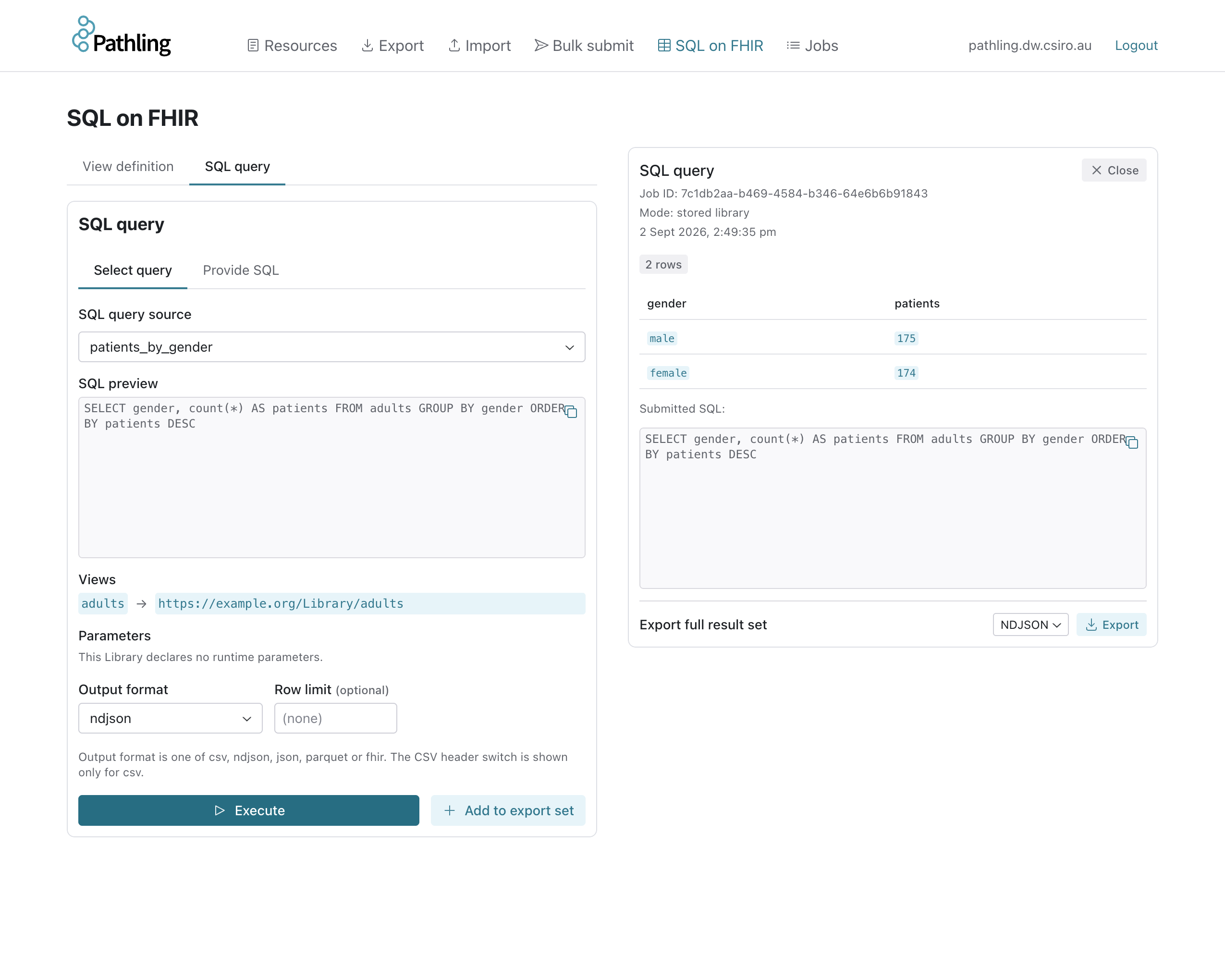
The admin UI resolves the same chain. Selecting a stored query shows its SQL, the views it reads and the parameters it declares, before running it:
Export related tables as one consistent snapshot
Analytical outputs rarely stand alone. A research extract might need a patient table, a conditions table and a medications table that agree with one another; a dashboard might need a dozen summary queries computed from the same data. In 2.x each of those was a separate export, and data written between them could leave the outputs inconsistent.
The new $sql-export operation carries any number of subjects in one job, in
any mixture of ViewDefinitions, SQLQueries and SQLViews. Every subject reads the
Delta table versions pinned when the job began, so a write that lands while the
job is running is invisible to all of them. The request is validated in full
before the job starts, and one completion manifest lists one output per subject.
curl -X POST 'http://localhost:8080/fhir/$sql-export' \
  -H 'Content-Type: application/fhir+json' \
  -H 'Prefer: respond-async' \
  -d '{
    "resourceType": "Parameters",
    "parameter": [
      {
        "name": "subject",
        "part": [
          { "name": "name", "valueString": "demographics" },
          {
            "name": "subjectCanonical",
            "valueCanonical": "https://example.org/ViewDefinition/demographics"
          }
        ]
      },
      {
        "name": "subject",
        "part": [
          { "name": "name", "valueString": "adults" },
          {
            "name": "subjectCanonical",
            "valueCanonical": "https://example.org/Library/adults"
          }
        ]
      },
      {
        "name": "subject",
        "part": [
          { "name": "name", "valueString": "patients_by_gender" },
          {
            "name": "subjectReference",
            "valueReference": { "reference": "Library/patients-by-gender" }
          }
        ]
      },
      { "name": "_format", "valueCode": "parquet" }
    ]
  }'
The server returns 202 Accepted with a Content-Location status URL. When the
job completes, polling it redirects to a manifest naming a download location
for each of the three outputs. Output formats are ndjson, csv and parquet.
The patient, group and _since parameters apply to every subject in the
job, so a cohort or an incremental window can be applied to the whole set at
once.
Because a shared dependency such as demographics is resolved once per job
rather than once per subject, exporting a family of related queries costs less
than exporting them separately.
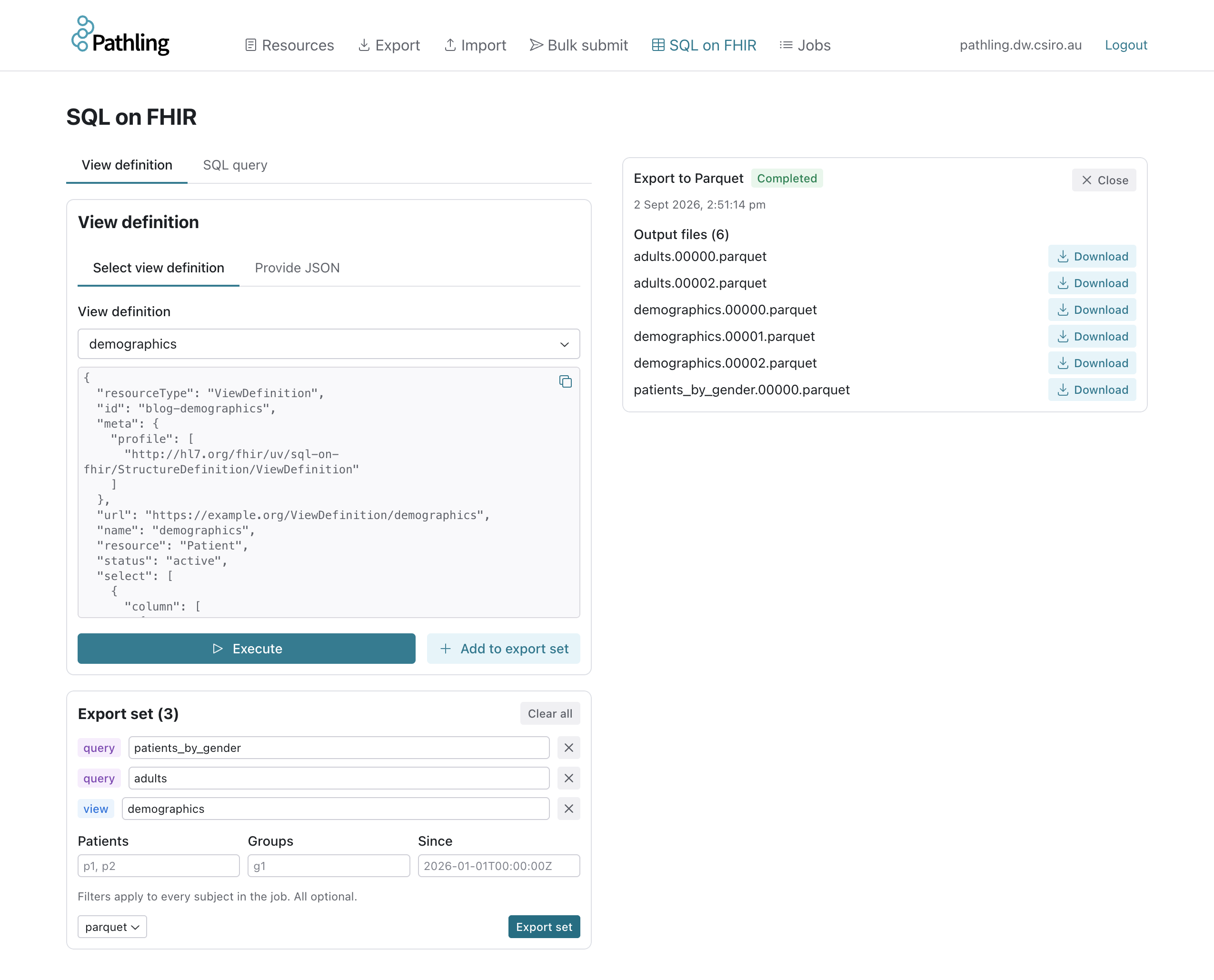
In the admin UI, views and queries are added to an export set, each with the name its output will take, and the whole set is exported in one job:
Read the docs: export.
Monitor jobs across the server
Import, export and SQL export all run asynchronously, and until now the only handle on a running job was the status URL returned when it started. Lose that response and there was no way to find the job again.
The new $jobs operation lists the asynchronous jobs held by the server, with
the operation that started each one, its derived status and progress, and the
URL to poll or cancel it:
curl 'http://localhost:8080/fhir/$jobs'
{
    "resourceType": "Parameters",
    "parameter": [
        {
            "name": "job",
            "part": [
                { "name": "id", "valueString": "7f3a9c1e-..." },
                { "name": "operation", "valueCode": "sql-export" },
                { "name": "status", "valueCode": "in-progress" },
                { "name": "progress", "valueInteger": 62 },
                { "name": "startTime", "valueInstant": "2026-09-02T00:42:11Z" },
                {
                    "name": "url",
                    "valueUri": "http://localhost:8080/fhir/$job?id=7f3a9c1e-..."
                }
            ]
        }
    ]
}
Visibility is governed by authorisation. When it is enabled, the caller must
hold the pathling:jobs authority, and sees only the jobs started under their
own token subject; a job can likewise only be cancelled by the principal that
created it. When authorisation is disabled, the list covers every job on the
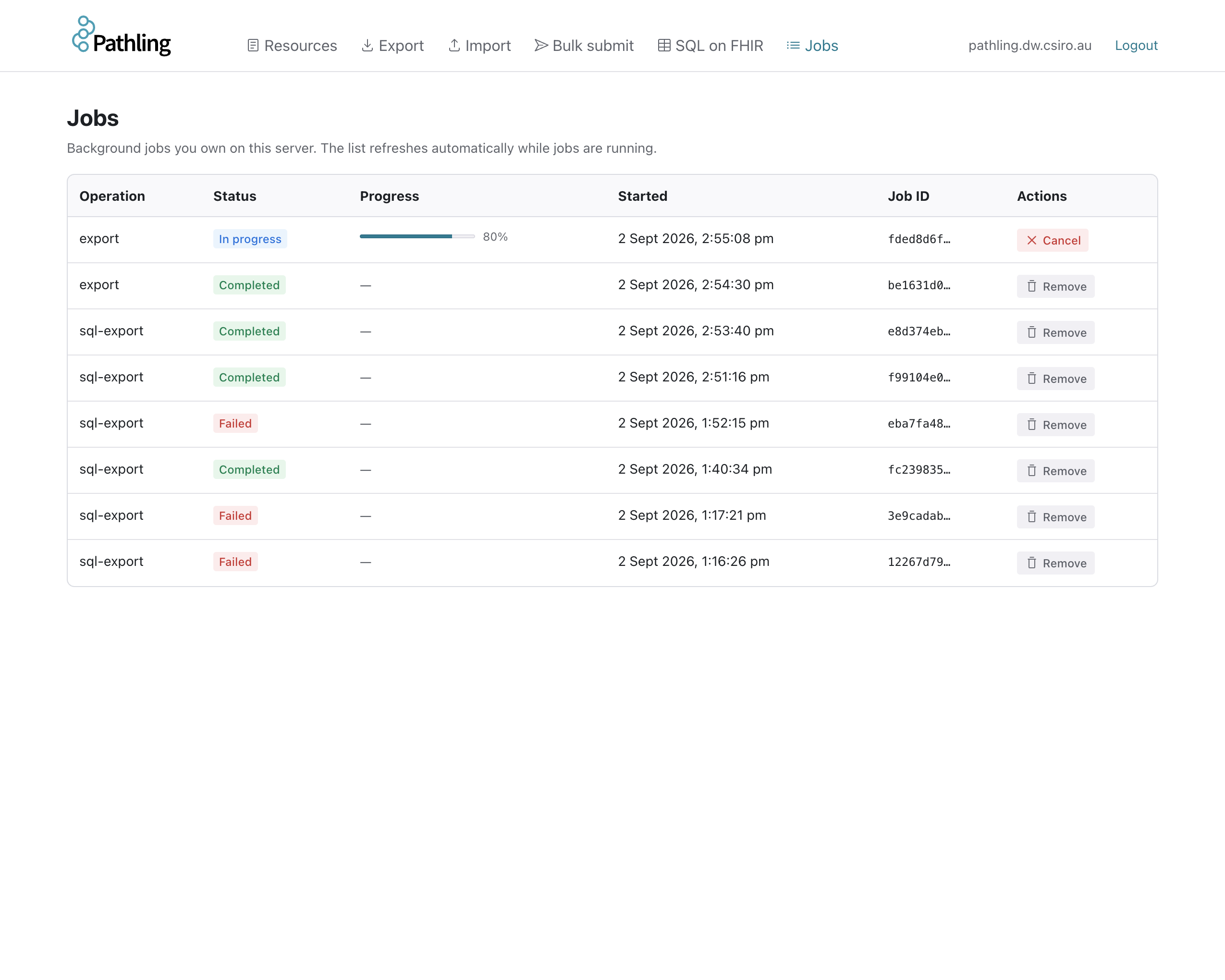
server. The admin UI has a corresponding jobs page, so an operator can see what
is running and cancel a runaway query without touching the API.
Read the docs: jobs.
Alignment with the SQL on FHIR ballot
Server 2.x implemented the operations from the SQL on FHIR continuous build at
the time: $viewdefinition-run, $viewdefinition-export and $sqlquery-run.
Ahead of the HL7 ballot of version 3.0.0, the specification consolidated those
into two operations,
$sql-run
and
$sql-export,
each accepting a ViewDefinition, SQLQuery or SQLView as its subject. Server
3.0.0 implements the two balloted operations and removes the three they
replace. The CapabilityStatement advertises the specification's canonical
operation definitions.
$sql-run is the synchronous counterpart to $sql-export. A stored subject can
be run with a plain GET, as in the cohort example above, or an inline subject
posted as a Parameters resource. Both operations report every problem in a
request in a single OperationOutcome, so a malformed request can be corrected
in one round trip.
Read the docs: run.
Other changes
- With
pathling.storage.schemaAutoMergeenabled, every table whose schema has drifted from the running encoders is migrated at startup and the in-memory dataset refreshed, so reads observe the new schema without a restart. pathling.auth.tokenSigningAlgorithmspins the accepted JWS algorithms. Left empty, they are derived from the issuer's JWKS at verification time, so key rotation at the identity provider takes effect without a restart.spark-hadoop-cloudis bundled, enabling the S3A magic committer for S3 warehouses, and asynchronous exports no longer fail withWrong FSon warehouses that are not on the default filesystem.- The Helm chart accepts additional trusted CA certificates and grants the driver the RBAC permissions it needs to manage executor scratch volumes.
- SQL queries accept window functions and named windows, and
DESCRIBEof a referenced view for schema introspection.
Upgrading from 2.x
The following changes need attention before deploying 3.0.0 over a 2.x installation:
| 2.x | 3.0.0 |
|---|---|
$viewdefinition-run, $sqlquery-run | $sql-run |
$viewdefinition-export | $sql-export |
pathling.operations.viewDefinitionRunEnabled | pathling.operations.sqlRunEnabled |
pathling.operations.viewDefinitionInstanceRunEnabled | removed; use $sql-run with subjectReference |
pathling.operations.viewDefinitionExportEnabled | pathling.operations.sqlExportEnabled |
pathling:view-run authority | pathling:sql-run |
pathling:view-export authority | pathling:sql-export |
pathling.sqlQuery.maxRows, pathling.sqlQuery.timeoutSeconds | removed; bound queries at the request or infrastructure level |
Two further authorisation changes apply when pathling.auth.enabled is true:
- Reading a resource by id now requires the
pathling:read-resourceoperation authority in addition to read access for the type. A token holding onlypathling:readno longer authorises the read interaction. - Running a stored subject requires read access to the type it is stored as:
ViewDefinitionfor a view,Libraryfor a SQLQuery or SQLView. Subjects supplied inline in the request are exempt.
The full list of changes, bug fixes and dependency updates is in the release notes. The documentation for 2.0.1 remains available under /docs/server/2.0.1.
Getting started
docker run -p 8080:8080 ghcr.io/aehrc/pathling:3
The FHIR API is at http://localhost:8080/fhir and the admin UI at
http://localhost:8080/admin/. For Kubernetes, use the
Helm chart. See the
server documentation for configuration and operation details.